# Keep your Markdown as written in Decap CMS
If your site's content lives in git and you edit it with [Decap CMS](https://decapcms.org), you may have seen this: you change one word in the editor, press Publish, and the commit touches lines you never opened. A `-` list turns into `*`, a backslash appears in front of a character, or a table loses its column alignment.
This page explains why that happens and how to swap in a widget that leaves the rest of the file alone.
## Why the stock widget rewrites lines
Decap's built-in `markdown` widget is tree-based. When you open an entry, it parses the Markdown body into a rich-text document tree. When you save, it writes brand-new Markdown out of that tree. (We compare the two designs in [Source-based vs tree-based Markdown editors](https://openmarkdown.dev/learn/source-vs-tree-markdown-editors).)
The tree records *what* something is, not *how you wrote it*. It knows a line is a list item, but not whether the marker was `-`, `*` or `+`. It knows a cell is right-aligned only if the serializer carries that over. So on save, the serializer's own style replaces yours across the whole body.
Decap's issue tracker has years of reports about this:
- [#2845](https://github.com/decaporg/decap-cms/issues/2845): tables
- [#5673](https://github.com/decaporg/decap-cms/issues/5673): backslashes added to the text
- [#2386](https://github.com/decaporg/decap-cms/issues/2386): footnotes escaped
## What we measured
We ran Decap CMS 3.17.3 with `decap-server` against four sample files and made the same edits through the Decap UI with two widgets. Then we counted the changed lines in `git diff`:
| Edit | Stock `markdown` widget | `openmarkdown` widget |
| --- | --- | --- |
| Save without touching the body | 0 | 0 |
| Append one word to the first line | 6–17 | 2 |
| Edit one table cell | 8 | 2 |
| Edit a cell so it is wider than its column | 10 | 10 (the column is re-padded) |
"2 lines" is the edited line itself, shown once as removed and once as added. Frontmatter is written by Decap, not by the body widget, so its YAML quoting changes the same way with either one.
## Switch in two steps
**1. Load the widget** after `decap-cms.js` in your admin page:
```html
```
If you build your admin with `decap-cms-app` instead, install `decap-cms-widget-openmarkdown` from npm and call `registerOpenMarkdownWidget(CMS)` before `CMS.init()`. Decap 3.17+ needs React ^19.1.
**2. Change the widget name** in `config.yml`:
```yaml
fields:
- { label: Body, name: body, widget: openmarkdown }
```
That's the whole change. The files are the same Markdown either way, so you can switch back by changing `openmarkdown` back to `markdown`.
## What editing looks like
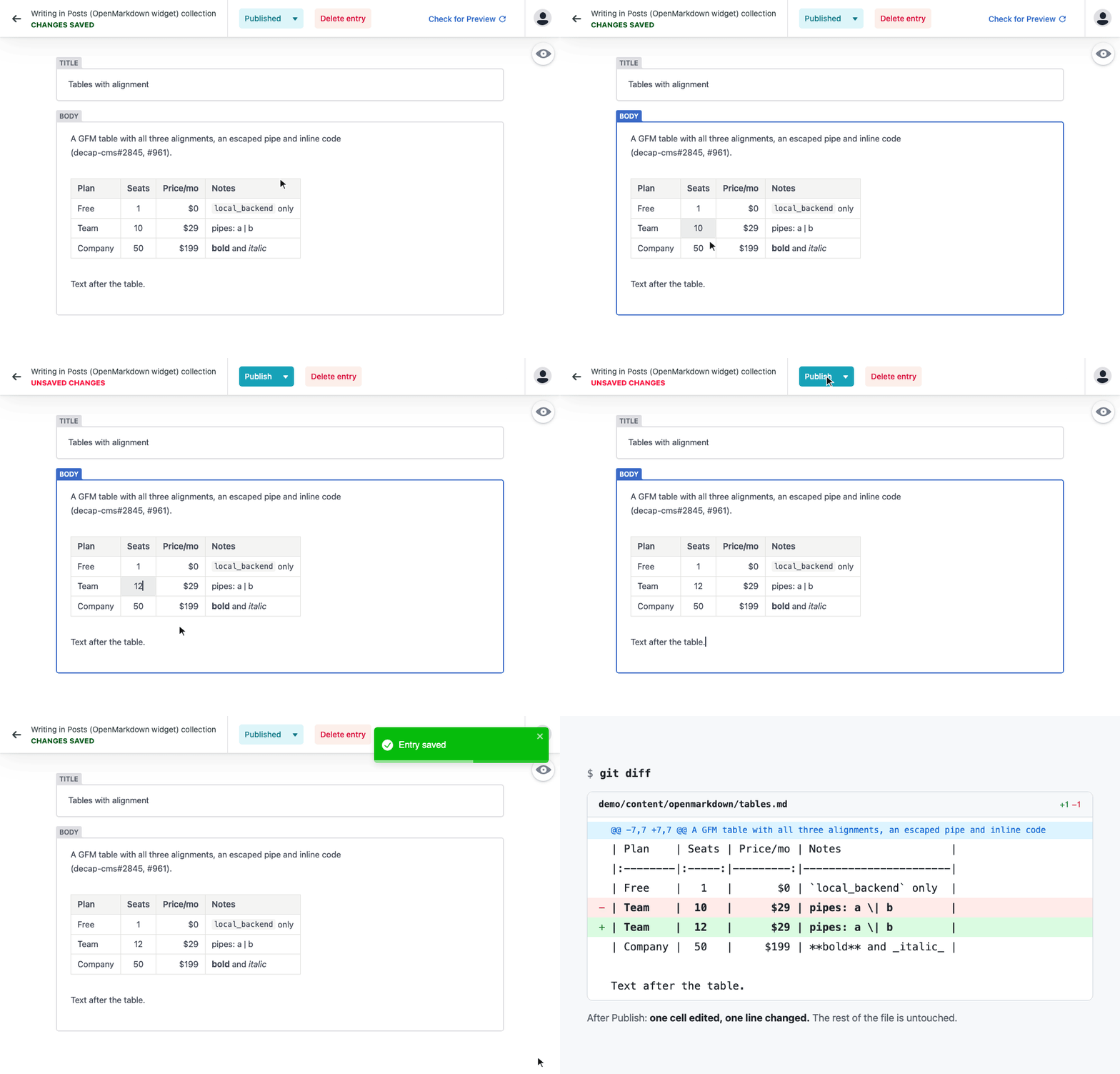
The widget edits the Markdown text directly and renders it as you type. The line with your cursor shows its Markdown, and the rest is rendered: tables (edited cell by cell inside the form), math, Mermaid diagrams, callouts, footnotes and task lists. Pasted or dropped images go through Decap's media library, the same way the image widget handles them.
It's built on [`@openmarkdown-dev/editor`](https://openmarkdown.dev/editor/), the MIT-licensed editor behind the OpenMarkdown app. The widget is open source: [github.com/OpenMarkdown-dev/decap-cms-widget-openmarkdown](https://github.com/OpenMarkdown-dev/decap-cms-widget-openmarkdown). Issues and pull requests are welcome.